
Technical SEO
What Google indexing is and why it determines whether your website can appear in search results
Publishing a page does not mean Google will show it. Before a website can appear in search results, Google must first discover it, crawl it, analyze it and index it.
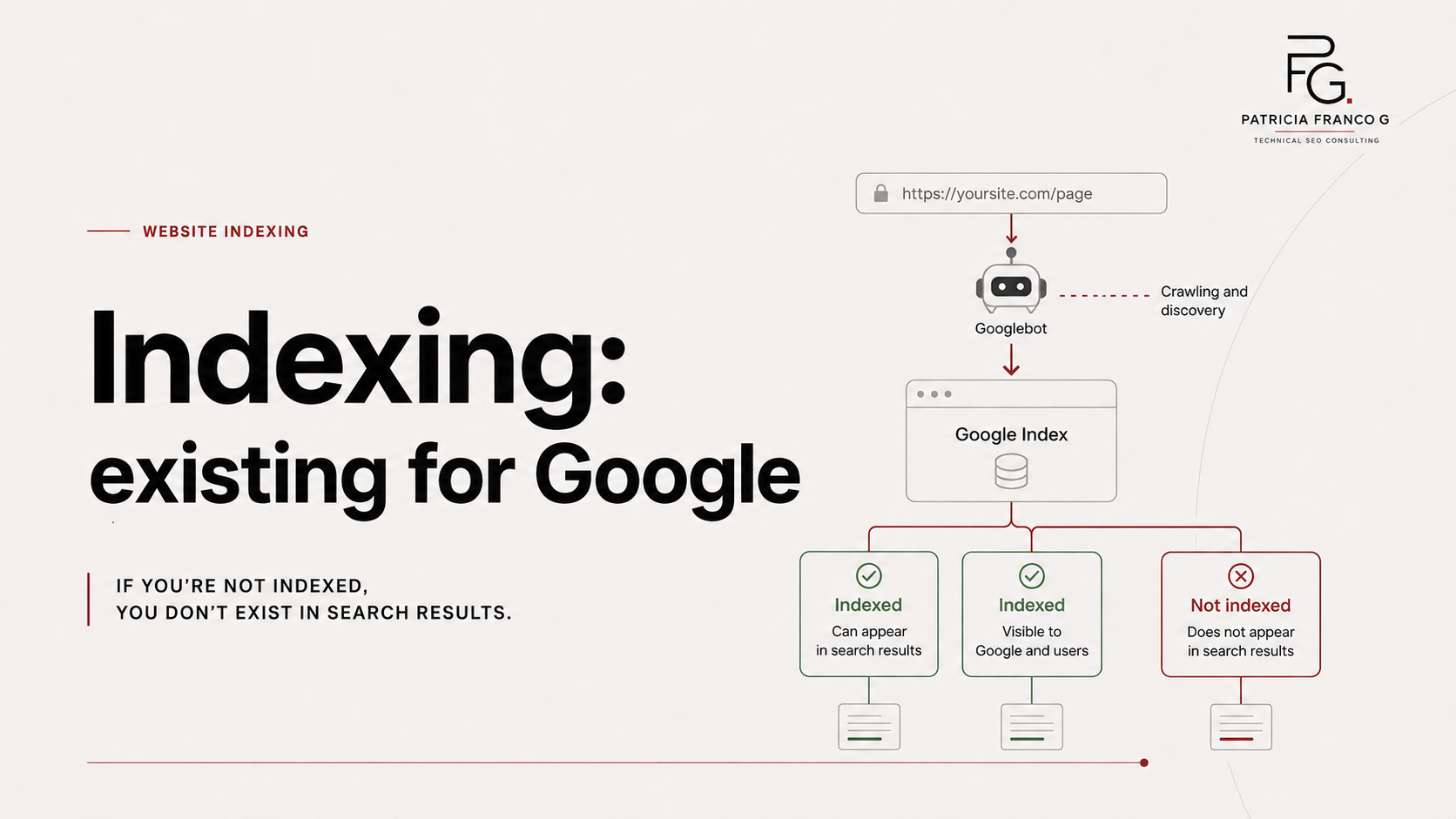
Google indexing is the process where Google analyzes a page and stores it in its index so it can be considered when someone performs a search. In practical terms, Google works through stages: crawling, indexing and serving search results.
Here is the simplest way to understand it:
A published page exists on the internet.
An indexed page exists for Google.
And a ranking page appears for a specific search.
Many business owners assume that having a website online is enough. But a page can be published, load correctly, look professional and still not be indexed.
That means the website exists for the business owner, but it is not functioning as an organic acquisition channel.
In this guide, I’ll explain what Google indexing is, how it works, why a page may not be indexed and what you should review before continuing to publish content without a technical diagnosis.
If your business depends on local searches, indexing is only the first step. Google also needs to understand your services, your city and your trust signals. You can go deeper into that in this guide on local SEO for service businesses.
1. What Google indexing is
Indexing is the process where Google analyzes a page and decides whether to add it to its index.
That index works like a massive database where Google organizes pages, content, signals, entities, images, links and other elements it can use to answer searches.
When someone searches on Google, the search engine is not scanning the entire internet in that exact moment. It is searching within its index.
That is why, if a page is not indexed, it cannot appear in organic search results.
It may exist. It may open. It may look good. But if it is not part of Google’s index, it has no real chance of bringing traffic from search.
Simple example
You publish a service page at:
https://yourwebsite.com/services
But Google has not indexed it. That means the URL works, but Google is not using it as a candidate to appear in search results.
The page exists for you. But it does not exist as a useful search result for Google.
2. The difference between crawling, indexing and ranking
One of the most common SEO mistakes is confusing these three concepts. They are not the same.
Crawling
Crawling happens when Googlebot discovers and visits a URL. Google uses automated programs called crawlers to explore the web and find pages that could be added to its index.
At this stage, Google tries to access the page. But access does not mean indexing.
Indexing
Indexing happens when Google analyzes the page, interprets its content and decides whether to store it in its index.
At this stage, Google may evaluate elements such as:
- Main content.
- Page titles.
- Images.
- Internal and external links.
- Canonical tags.
- Technical signals.
- Duplicate content.
- Content quality.
- Mobile version.
- Relationship with other pages.
Google can crawl a page and still decide not to index it.
Ranking
Ranking happens when an indexed page appears in search results for a specific query.
A page can be indexed and still fail to rank well. That means Google knows the page exists, but does not consider it relevant, useful or competitive enough to show prominently.
- Discovery
- Crawling
- Rendering
- Indexing
- Ranking
- Lead Generation
If one stage fails, the website becomes invisible.
3. Why a published page may not be indexed
A page may not be indexed for many reasons. Some are technical. Others are related to content, structure or authority.
These are the most common causes:
- Google has not discovered the URL yet.
- The page is not internally linked.
- The sitemap does not include the page.
- The robots.txt file blocks crawling.
- The page has a noindex tag.
- The canonical points to another URL.
- The content is too thin.
- The page looks duplicated.
- The website has low authority.
- The URL performs poorly on mobile.
- There are server errors.
- The page is too deep in the site architecture.
- Google crawled the page but chose not to index it.
Indexing is not just about “submitting a page to Google.” It depends on whether that page makes sense within the full system of the website.
An isolated URL with no internal links, weak content and unclear signals has a lower chance of being indexed and ranked.
4. How to know if a page is indexed
The fastest manual check is to search Google using:
site:yourwebsite.com/page-url
Or review the whole domain with:
site:yourwebsite.com
But this is only an initial signal. The most accurate way to check indexing is through Google Search Console.
The URL Inspection tool allows you to review information about the version Google has indexed and test whether a URL can be indexed.
What to check in Search Console
Open Google Search Console and paste the exact URL into the inspection bar. You may see messages such as:
- URL is on Google.
- URL is not on Google.
- Page is indexed.
- Page is not indexed.
- Discovered, currently not indexed.
- Crawled, currently not indexed.
- Excluded by noindex tag.
- Blocked by robots.txt.
- Alternate page with proper canonical tag.
Each message points to a different cause. And each cause requires a different correction. Not every indexing issue is fixed by requesting indexing.
5. What “URL is not on Google” means
When Search Console shows “URL is not on Google,” it means that page is not part of Google’s index. But the reason can vary.
It does not always mean the page is bad. Sometimes Google has not discovered it yet. Sometimes Google discovered it but has not crawled it. Sometimes Google crawled it and decided not to index it. And sometimes a technical signal is telling Google not to index it.
Common cases
Discovered, currently not indexed: Google knows the URL exists, but has not crawled or fully processed it yet.
Crawled, currently not indexed: Google visited the page, but decided not to add it to the index at that time.
Excluded by noindex: The page contains an instruction telling Google not to index it.
Blocked by robots.txt: Google cannot crawl the URL because of a blocking rule.
Alternate page with canonical: Google believes another URL is the primary version.
The message should never be interpreted in isolation. It needs context. A newly published page may take time. But an important page that has been out of the index for weeks needs a real diagnosis.
6. Sitemap, robots.txt and noindex: three critical signals
Indexing depends heavily on the technical signals Google receives. Three of the most important are sitemap, robots.txt and noindex.
Sitemap
A sitemap helps Google discover important URLs on your website. It does not guarantee indexing, but it supports discovery and helps Google understand the structure of your site.
A poorly configured sitemap can leave important pages out or include URLs that should not be there.
Robots.txt
The robots.txt file tells crawlers which URLs they can visit within a website. Problems happen when it accidentally blocks important pages.
For example:
Disallow: /
That rule can prevent Google from crawling the entire site.
Noindex
A noindex tag tells Google not to index a page. It can appear in the page code or in an HTTP header.
This often happens when a website was in development and then goes live without removing that instruction.
Quick difference:
A sitemap helps Google discover.
Robots.txt can prevent crawling.
Noindex prevents indexing.
If one of these signals is misconfigured, organic visibility can be blocked at the foundation.
7. Which pages should be indexed and which should not
Not every page on a website should be indexed. Indexing should be strategic.
Google does not need to see everything. It needs to see what matters.
Pages that usually should be indexed
- Homepage.
- Main service pages.
- City or location pages, when they provide real value.
- Helpful blog articles.
- Case studies.
- Contact pages.
- Important category pages.
- Commercial pages with clear search intent.
For service-based businesses, local pages can be especially important. The goal is not to create city pages without a strategy. The goal is to build pages that answer real searches like “service + city” or “professional near me.”
To understand this better, read the guide on how to show up when people search for services in your city.
Pages that usually should not be indexed
- Test pages.
- Thank-you pages.
- Internal search results.
- Duplicate pages.
- Parameter URLs with no search value.
- Cart or private process pages.
- Duplicated legal pages.
- Internal files with no SEO intent.
- Thin pages with no useful content.
Indexing everything is not a strategy. A strong website does not try to push every random URL into Google.
It helps Google understand which pages matter, why they exist and what search intent they serve.
8. Common errors that block indexing
Indexing problems are not always visible in the design. A website can look fine and still be blocked underneath.
These are common issues:
- The “discourage search engines” setting is active in WordPress.
- Noindex tags are placed on important pages.
- The sitemap is empty or incorrect.
- Robots.txt blocks key sections.
- Canonical tags point to another URL.
- Important pages have no internal links.
- Blog posts are orphaned.
- Content is duplicated.
- URLs return 404 errors.
- Redirects are misconfigured.
- Content loads in a way Google cannot interpret properly.
- The website is slow or performs poorly on mobile.
- Pages are too similar to each other.
- The site architecture has no clear hierarchy.
The cause can be small. The impact can be expensive.
One misplaced noindex instruction can keep a critical service page out of Google. A bad robots.txt rule can block an entire section. Weak architecture can prevent Google from finding URLs that should be ranking.
9. How to improve the chances of indexing
You cannot force Google to index a page. But you can improve the signals that help a page get discovered, crawled and indexed.
1. Make sure the page can be crawled
Check that the page is not blocked by robots.txt.
2. Remove noindex if the page should appear
Confirm that the page is configured as indexable.
3. Include it in the sitemap
If the URL is important, it should be included in the sitemap.
4. Link to it from other pages
Google uses links to discover pages and understand relationships between URLs. A page with no internal links is weaker within the site system.
5. Improve the content
The page should answer a real search intent. It should explain what you offer, who it is for, what problem it solves and what action the user should take.
6. Review the canonical
If the canonical points to another URL, Google may choose that other page as the primary version.
7. Review the mobile version
Google uses the mobile version of your content for indexing and ranking through mobile-first indexing.
If your mobile version is incomplete or loads poorly, that can affect how Google understands the page.
8. Request indexing after fixing the issue
Requesting indexing should be the final step, not the first one.
First, fix the problem. Then request indexing.
10. Quick indexing checklist
Before assuming Google “does not want to show your page,” check this:
- The URL opens correctly.
- The page returns a 200 status code.
- It is not blocked by robots.txt.
- It does not have a noindex tag.
- The canonical points to the correct URL.
- The page is included in the sitemap.
- The sitemap has been submitted in Search Console.
- The page has internal links.
- It is not an orphan page.
- The content is useful and complete enough.
- The search intent is clear.
- The page loads properly on mobile.
- It is not a duplicate of another URL.
- It has a title tag and meta description.
- It has a clear H1.
- It has a logical heading structure.
- It links to related pages.
- Search Console does not show serious blockers.
- The URL was inspected after corrections were made.
If several of these items fail, you are not dealing with a patience problem. You are dealing with an infrastructure problem.
11. Frequently asked questions
Is indexing the same as ranking?
No. Indexing means Google has added the page to its index. Ranking means that page appears in the results for a specific search.
A page can be indexed and still receive no traffic.
How long does it take Google to index a page?
It can take a few days or several weeks. If an important page has been unindexed for a long time, you should review the technical signals and the content quality.
Does submitting a page in Search Console guarantee indexing?
No. Requesting indexing can help Google review a URL, but it does not guarantee that the page will be added to the index.
If the page is blocked, has noindex, has weak content or sends confusing signals, it may remain excluded.
Can a page be removed from the index after being in Google?
Yes. A page can leave the index if its configuration changes, if it receives a noindex tag, if it becomes blocked, if it returns errors, if it is deleted, if it is redirected or if Google decides not to keep it indexed.
That is why indexing should not be checked once and forgotten. It should be monitored.
Should every page on my website be indexed?
No. Only pages with value for search, business or authority should be indexed.
There is no value in indexing internal, duplicate, thin or non-SEO pages.
What does indexing have to do with local SEO?
If your business depends on a city or service area, your local pages must be crawlable and indexable.
But indexing alone is not enough. Google also needs to understand what service you offer, where you operate, what local signals your business has and how trustworthy you look compared with competing results.
12. Conclusion
Google indexing is one of the foundations of technical SEO.
Without indexing, there is no real opportunity to rank. And without ranking, your website will struggle to become an organic acquisition channel.
A published page is not always a visible page.
For Google to consider it, the page must be discoverable, crawlable, understandable and valuable enough to be added to the index.
If your website does not appear, if key service pages are missing from search or if your articles generate no impressions, the first step is not publishing more content without direction.
The first step is reviewing the system.
- Crawling.
- Indexing.
- Sitemap.
- Robots.txt.
- Noindex.
- Canonicals.
- Architecture.
- Content.
- Internal links.
- Google Search Console.
A well-indexed website is not a website full of random URLs.
It is a website where the important pages exist for Google, have a clear business purpose and belong to a structure designed to generate visibility, traffic and real opportunities.
13. Recommended next reading
Understanding indexing is the first step. But if your business depends on clients in a specific city or service area, you also need to build local signals, optimize Google Business Profile, earn reviews, create service pages and keep your business data consistent.
Read the next guide: Local SEO: how to show up when people search for services in your city.
Not sure if your most important pages are indexed?
A Strategic SEO Audit reviews crawling, indexing, sitemap, robots.txt, canonicals, site architecture and blocked pages so you can stop guessing and start fixing what actually matters.
Request an SEO Audit